
ProofVera

Before After Proof

Photograph the job before and after, get the client's signature, and hand over a PDF report.

ProofVera, screenshot

ProofVera is a job documentation app for tradespeople and field crews. You photograph the site before you start, log the work and any extra jobs as they happen, then get the client's signature at handover and export a PDF report with your logo on it. There is no account to create, and everything stays on your phone.

From the screens

  • ProofVera: Before After Proof, from the screens 1
  • ProofVera: Before After Proof, from the screens 2
  • ProofVera: Before After Proof, from the screens 3
  • ProofVera: Before After Proof, from the screens 4
  • ProofVera: Before After Proof, from the screens 5
  • ProofVera: Before After Proof, from the screens 6
  • ProofVera: Before After Proof, from the screens 7
  • ProofVera: Before After Proof, from the screens 8

What it does

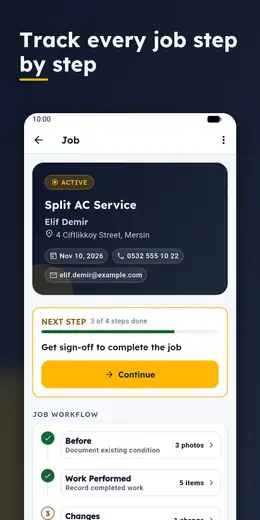
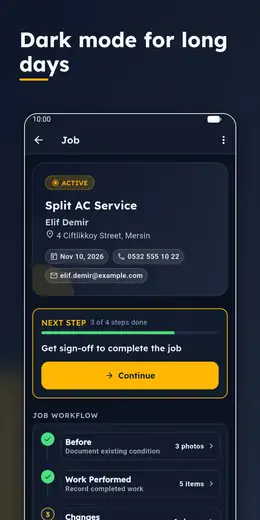
  1. A Before / Work / Changes / After / Completion flow: every job moves through these five steps, and a 'next step' card on the job screen shows which one is up.
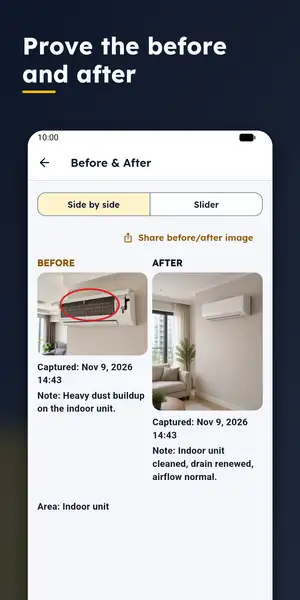
  2. Before photos are taken per area (for example Living room, Indoor unit, Outdoor unit); when you shoot the After photo, the Before photo shows as a faint guide.
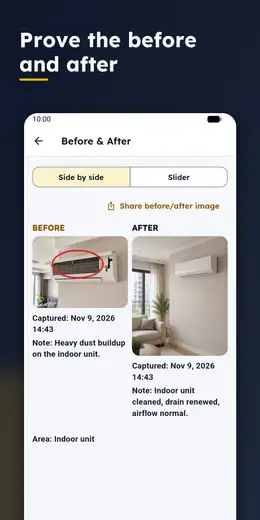
  3. Side-by-side and slider before/after comparison; share the comparison as a single image (the free version adds a small 'prepared with ProofVera' footer).
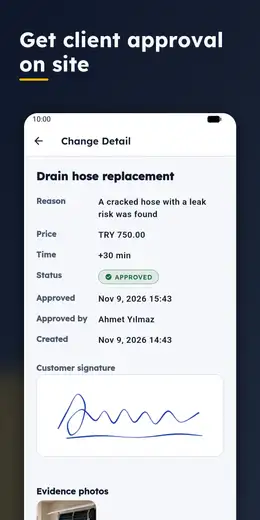
  4. Change orders the client approves on the spot: description, reason, price and time impact, a drawn signature; the signature pad has undo, full-screen landscape mode, signer name and time.
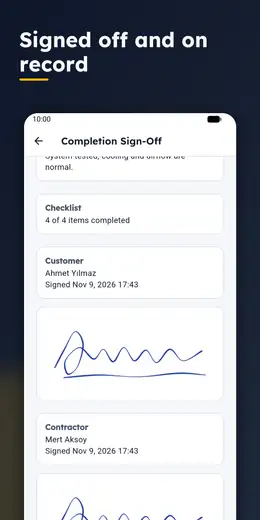
  5. A completion checklist and a completion record signed by both client and contractor.
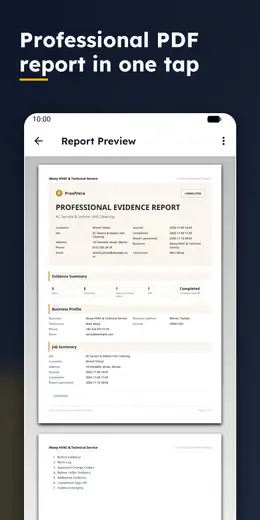
  6. A PDF report with your business logo, a contents page and photos; a SHA-256 fingerprint per photo and an evidence summary with a QR code in the report.
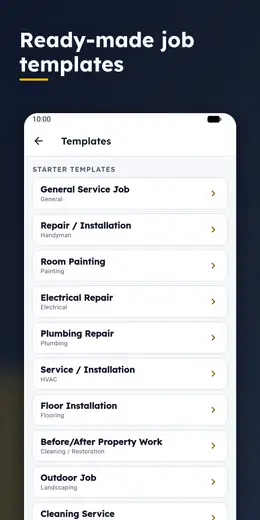
  7. 14 ready-made job templates (HVAC, electrical, plumbing, painting, flooring, tiling, roofing and insulation and more) in Turkish and English; custom templates in Pro.
  8. Photo markup with arrows, circles, rectangles and text (Pro); punch list (Pro); Evidence Pack, a ZIP of the PDF and photos (Pro); backup export (Pro).

The story

What a job looks like on screen

The app is built around a five-step flow: Before, Work, Changes, After, Completion. On the job screen the steps are laid out in order, and a "next step" card tells you which one is up. The card shows a progress bar and one main button, so you never have to work out what comes next.

Before. You photograph the site and sort the photos into areas. In the demo job on our store screenshots those areas are "Living room", "Indoor unit" and "Outdoor unit". Each photo can carry a note ("heavy dust buildup on the indoor unit"). In Pro you can draw on a photo with arrows, circles, rectangles and text; the red circle in our screenshots is exactly that.

Work. You add work items, tick them off and attach photos.

Changes. When extra work comes up, you write down the description, the reason, and the price and time impact, and the client signs on the screen. The same signature pad is used everywhere: undo, a full-screen landscape mode, and the signer's name and time.

After. When the camera opens for an After photo, the Before photo shows as a faint guide, which makes it easier to shoot from the same angle. You can then compare matched pairs side by side or with a slider, and share the result as one image (the free version adds a small "prepared with ProofVera" line).

Completion. You finish the checklist, and the client and the contractor both sign.

At the end you get a PDF report with your business logo, a contents page and photos. Each photo has a SHA-256 fingerprint, and the report has an evidence summary and a QR code. That shows the file has not changed since it was saved; it does not show who took the photo, where, or the real time. The app says so too.

Starter templates

You do not have to start from a blank page. There are 14 ready-made templates, including HVAC service, electrical and plumbing repair, room painting, flooring, tiling, doors and windows, roofing and insulation, cleaning, and kitchen and bathroom renovation. Each brings the "before" areas and completion checklist that fit the trade; room painting, for instance, starts with walls, ceiling, trim, doors and windows, and floor protection. In Pro you can write your own.

Why it is designed this way

Our design document calls the app an "accessible field tool": high contrast, large touch targets that work with gloves or in sunlight (the main button is 54 dp tall), and no heavy decoration. We use brand gold only as a fill, never for small text, because we measured it and found it unreadable on a light background, so we rebuilt the palette.

On privacy the decision is plain: no server of ours, no account, no ads, no analytics. Photos, signatures and client details stay on the phone and only leave it when you share a report, an Evidence Pack or a backup. We turned off Android's automatic backup to your Google account for this app's data; backups are made from inside the app.

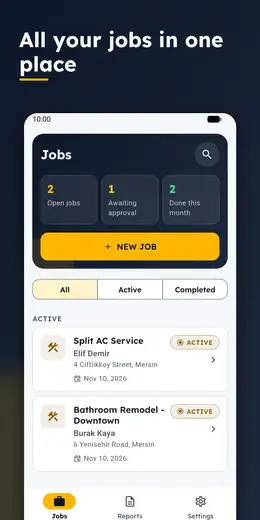
Pricing is simple as well. The free version allows 2 active jobs, 3 PDF reports and 1 approved change at a time. ProofVera Pro is a one-time purchase, not a subscription.

Frequently asked

Is ProofVera free?

It is free to install. The free version allows 2 active jobs, 3 PDF reports and 1 approved change at a time. ProofVera Pro is a one-time purchase, not a subscription, and removes the limits.

Do I need an account or an internet connection?

There is no account. Photos, signatures and jobs stay on your phone and there is no cloud sync. The app works offline; buying or restoring Pro needs a connection to Google Play.

What do the photo fingerprints and the QR code show?

Each photo gets a SHA-256 fingerprint, and the report includes an evidence summary and a QR code. This shows that a file has not changed since it was saved. It does not show who took the photo, where, or the real time.

How do I collect a client's signature?

For approving extra work and at handover, the client signs on the screen with a finger. There is undo, a full-screen landscape mode, and the signer's name and time are recorded. At handover the contractor signs too.

Which trades have templates?

14 ready-made templates: HVAC, electrical, plumbing, painting, flooring, tiling, doors and windows, roofing and insulation, cleaning, kitchen and bathroom renovation, outdoor work and more. In Pro you can write your own.

How do I back up my data?

In Settings you create a backup ZIP and choose where to save it. Backup export is a Pro feature. Android's automatic cloud backup is turned off for this app.